• Sari la conținut

BobbyVoicu.ro

  • Home
  • Arhiva (2005-2013)
  • Home
  • Arhiva (2005-2013)

Arhiva: decembrie 2013

Continuă în arhiva completă

  • Toate
  • Română
  • English

[Job] iOS Developer at MavenHut

ENîn engleză Misc · December 18, 2013

[JOB] iOS developer at MavenHut

MavenHut is growing. Faster than we expected, actually. As a consequence, we are bringing more people on board (adding to the 16 we already are in the office). And one or more of them should be an iOS developer :)

So, if you are an iOS developer and you want to program fun games, played by millions of users around the world, you want to experience a Silicon Valley like startup life, but closer to home (our dev HQ is in Bucharest), you should give us a nudge (mail to beatrice.galatanu A T mavenhut.com).

fotografii-mavenhut-lr-49Actually, to see more of MavenHut’s offices and attitude, you could read this article in Adevarul or see this video from Antena3 (starting with 11:30 mark or so). We are a fun team to work with :D

Here are some details on what we are looking for:

– iOS development – minimum 2 years
– Objective – C and iOS API
– Socket programming on iOS
– experience in migrating web apps to mobile apps
– experience in delivering complex apps to market which interact with an online API
– Familiarity with XML/ REST Services
– Portfolio required, personal or teamwork
– Game Center integration experience is a plus (though it’s actually not that difficult anyway, even I could do it… in a much longer time :D )

If you are interested, fire an email to beatrice.galatanu A T mavenhut.com.

Photos by Dragos Asaftei

Fallout 1,2 and Tactics for Free on GOG.com

ENîn engleză Misc · December 13, 2013

steamworkshop_webupload_previewfile_183735003_preview

For everybody that played RPGs in the late 90s, Fallout is one of the games that made us lose countless hours in the wasteland of a postapocaliptic America.

The first two games are the games I wait for the most to come to iPad (well, and Planescape: Torment). So, while I already had them bought on Steam, I also got them for free, DRM-free, from GOG.com. The promotion is up and running for one more day, so go there and get them. It is really worth replaying them when you have the time.

[Tools I Use] Use Evernote WebClipper with Chrome/Safari on iOS

ENîn engleză Tools I Use · December 1, 2013

I am an avid Evernote user. Everything I find interesting I clip it into Evernote and find it there whenever I need it. The biggest issue I’ve had, though, with this is the fact that you do not have an addon for iOS browsers (Chrome/Safari).

Well, not anymore :D

Today I’ve found a workaround that is actually quite interesting and easy to use.

1.Step 1

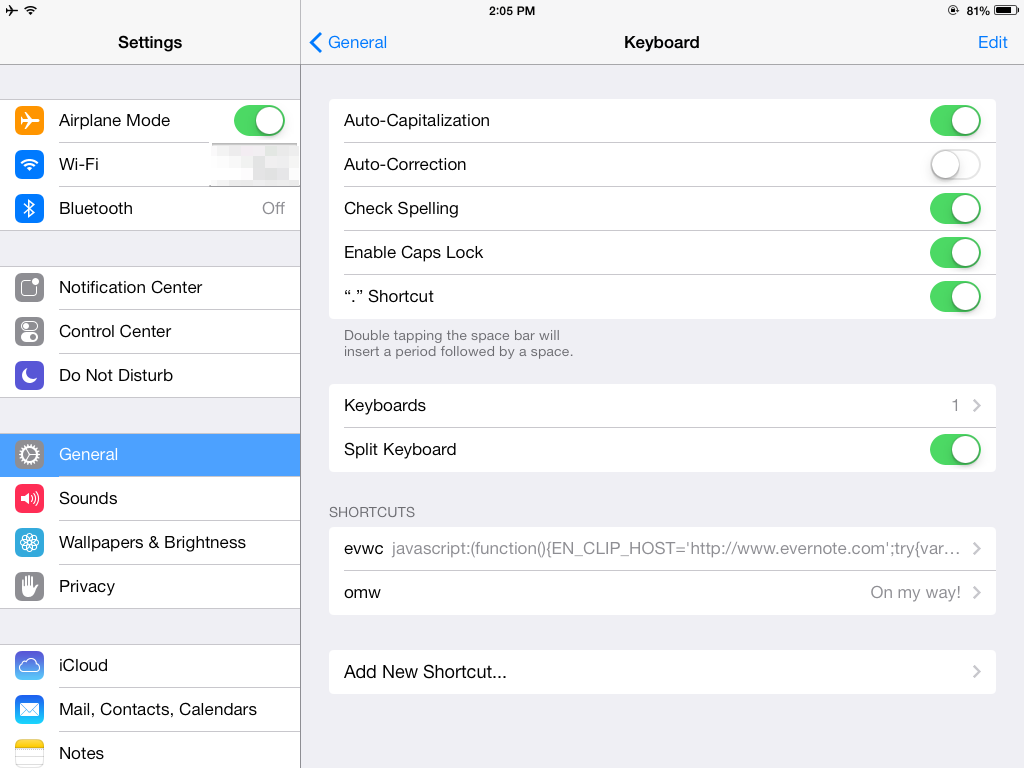
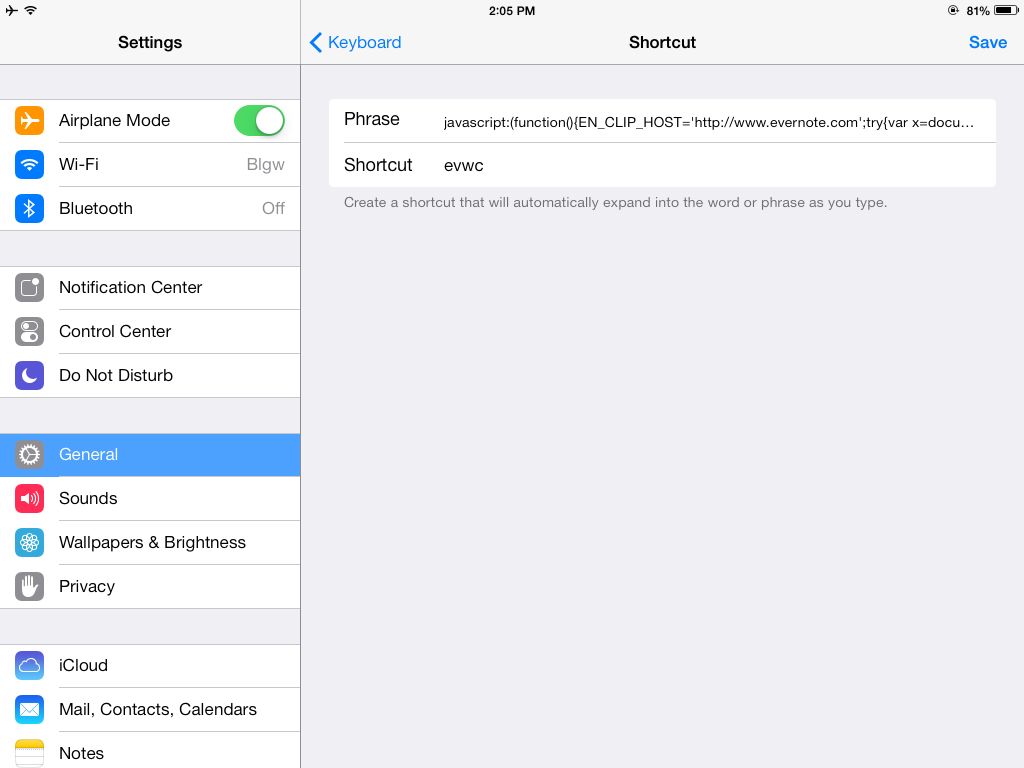
Create a Keyboard shortcut with the webclipper code. I don’t use it generally, but you can do it by going to Settings -> Keyboard -> Shortcuts (see the screen below).

Create a shortcut by naming it whatever you want (mine is called evwc, from EVernote WebClipper). It’s better to use a combination of letters that is not easy to find in websites, because then the autocomplete of Chrome will kick in and it will not work.

The code you need to put in the shortcut is this:

javascript:(function(){EN_CLIP_HOST='http://www.evernote.com';try{var x=document.createElement('SCRIPT');x.type='text/javascript';x.src=EN_CLIP_HOST+'/public/bookmarkClipper.js?'+(new Date().getTime()/100000);document.getElementsByTagName('head')[0].appendChild(x);}catch(e){location.href=EN_CLIP_HOST+'/clip.action?url='+encodeURIComponent(location.href)+'&title='+encodeURIComponent(document.title);}})()

Hit Save, then get back to Settings -> General

2013-12-01_14.05.24

2013-12-01_14.05.27

2. Step 2

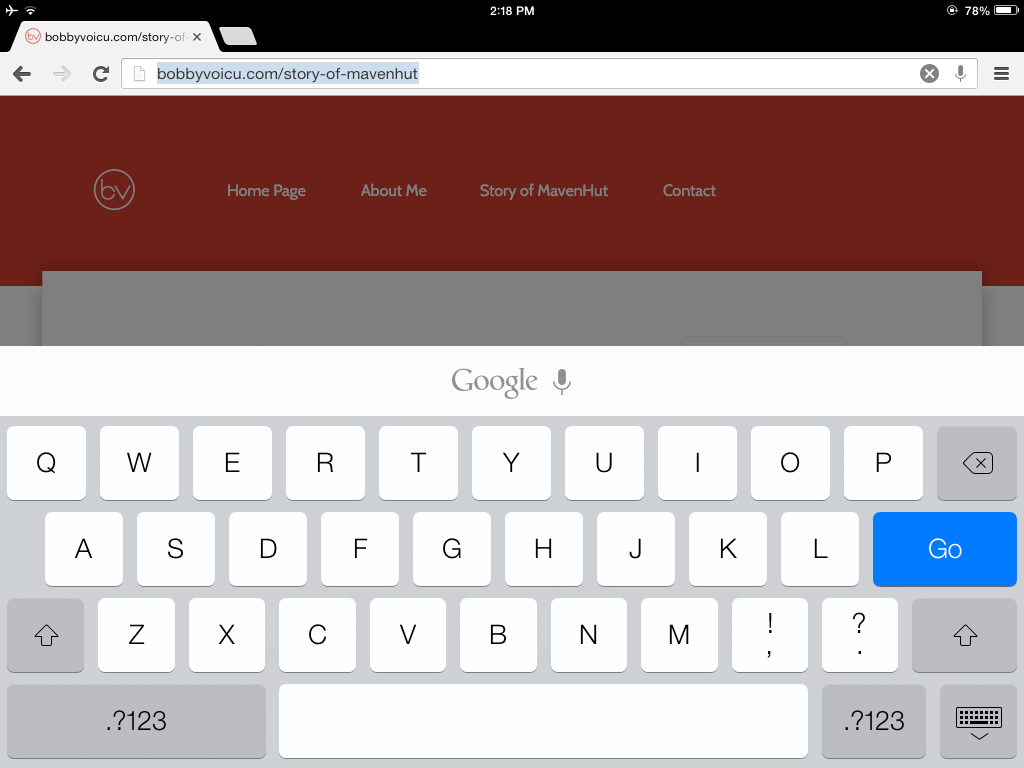
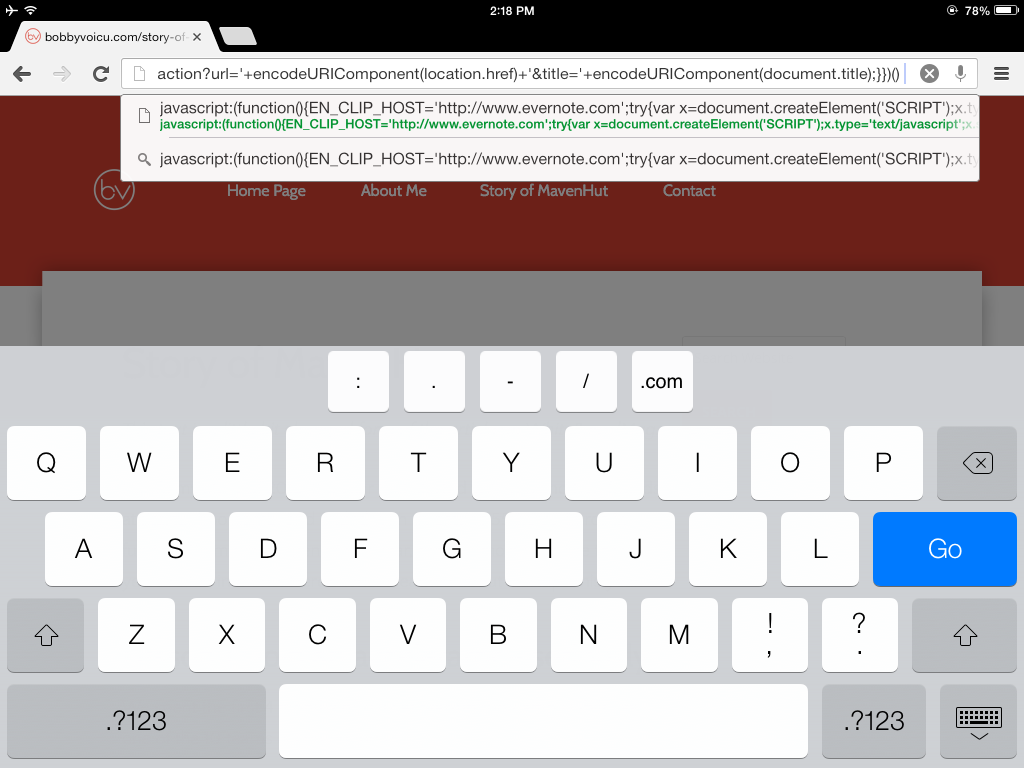
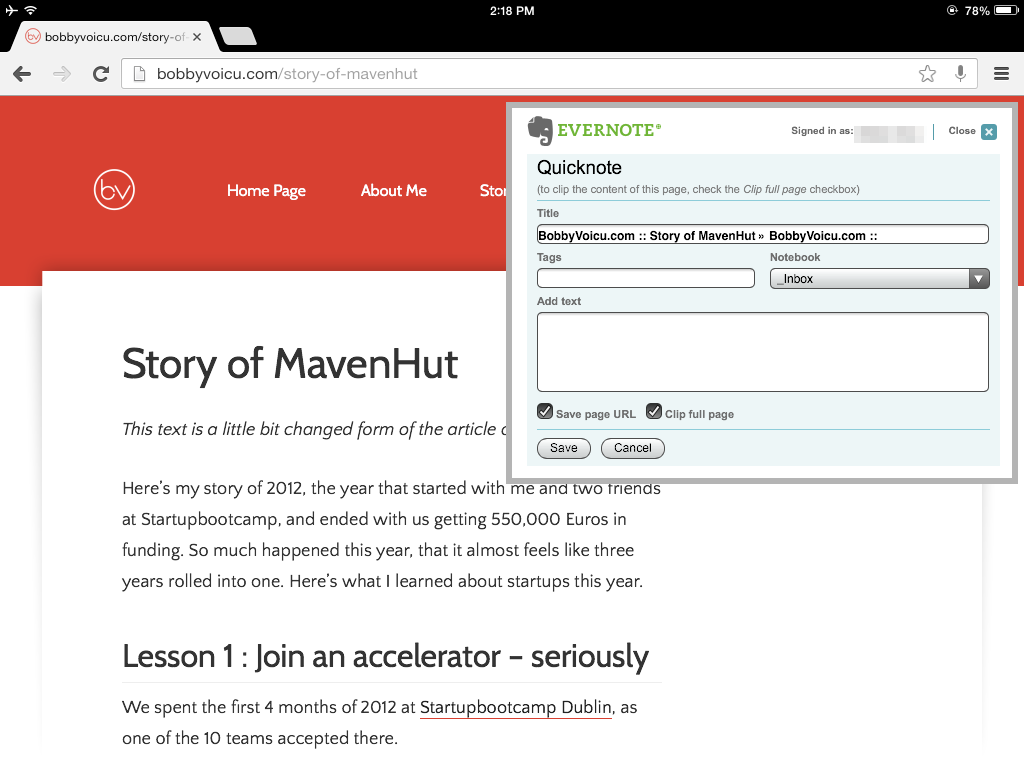
Go to Chrome/Safari and open the page you want to clip. Click on the top URL (this will select the entire URL), then write your shortcut name (evwc is mine), press SpaceBar and then press Go. It will open a

See the steps below:

2013-12-01_14.18.35

2013-12-01_14.18.42

2013-12-01_14.18.45

2013-12-01_14.18.56

At the end, you can see the Evernote window and.. that’s it! :)

Though the example above is shown on Chrome on iPad, it also works on Safari and on iPhones.

Got the info from these two pages: Cute Chrome iOS easy workaround and CTRLQ

Despre

Scriu. Fara un subiect anume, fara o tema anume.

Aici e o arhiva a perioadei 2005-2013, cand scriam ceva mai des pe blog.

Scrise recent

  • Logo-ul Blanket
  • Elogiu pentru o tastatura: Thinkpad T480
  • Cartile din 2025
  • Bucuria de a fi iritat (si, probabil, iritant)
  • Cum sa iti dai seama la ce esti bun(a)

Proiecte

  • BobbyVoicu.com
  • MixRift

Copyright © 2026 · BobbyVoicu.ro